FiveM Tattoo Creator
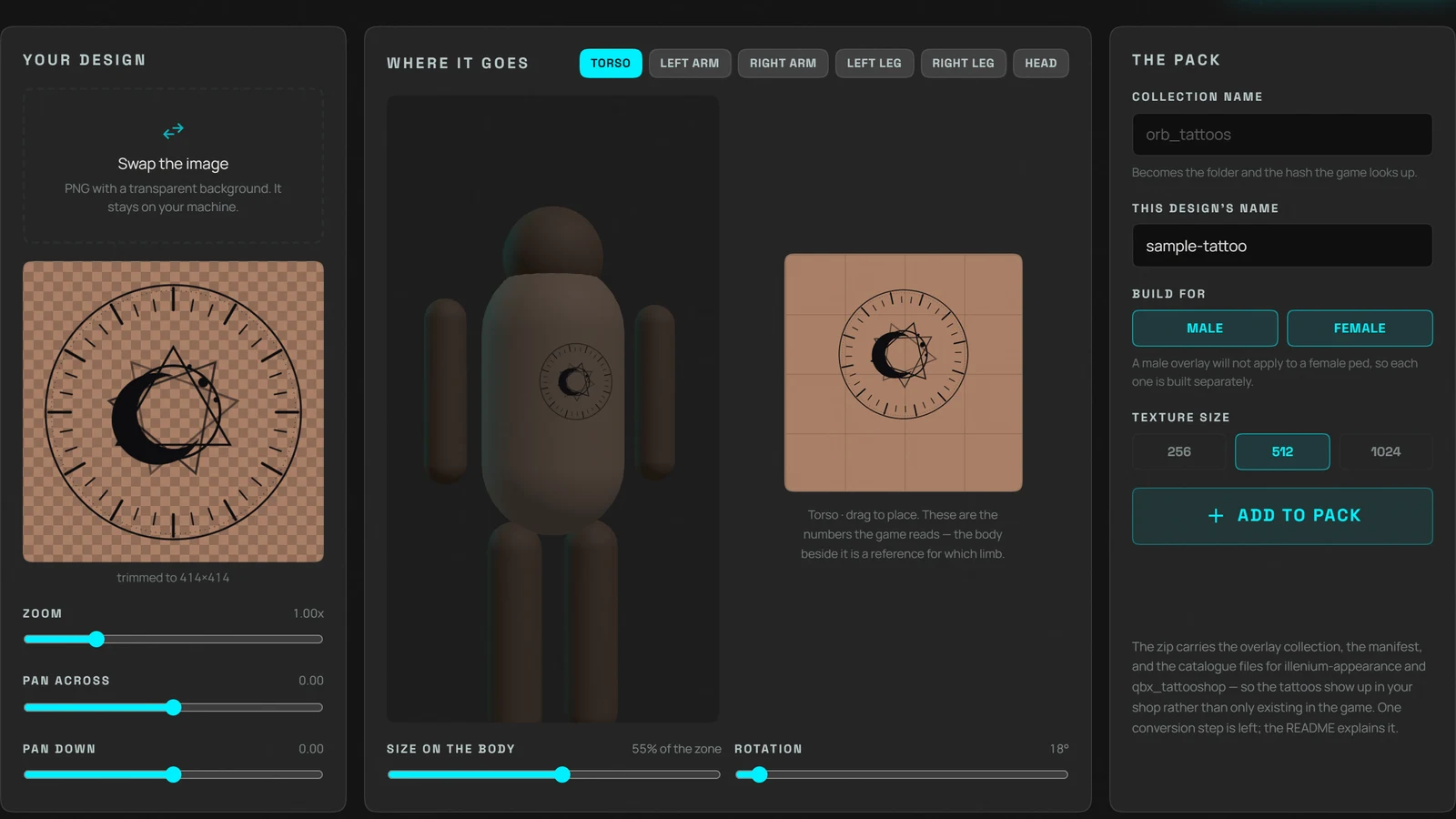
A FiveM tattoo is a decal applied to a ped through a decoration collection. This free browser tool builds one from any image: crop the design, choose a body zone, position it, and download a resource containing the texture, the overlay collection and the catalogue files ESX and QBCore tattoo shops read.
Turn any image into a tattoo your players can wear. Crop the design, pick the body zone, position it against a 3D body, and export a resource with the texture, the overlay collection and the catalogue your tattoo shop reads. The design is cropped and compressed on your machine; only the finished texture reaches us, and only to build the container GTA needs.
How it works
- 1
Drop your design
A PNG with a transparent background works best: the transparency is what makes it a tattoo rather than a rectangle stuck to someone's chest. Crop and frame it right in the page.
- 2
Choose the zone
Torso, either arm, either leg or the head. A tattoo belongs to one zone, and that choice decides which part of the ped's skin the decal lands on.
- 3
Place it
Drag it where you want it, size it and turn it. What you set becomes the uvPos, scale and rotation the game reads, so the placement you see is the placement it stores.
- 4
Export the pack
Download a resource with the texture, the overlay collection, the manifest and the JSON that illenium-appearance and qbx_tattooshop read, so it appears in your shop rather than only existing in the game.
Features
Male and female in one pass
A male overlay will not apply to a female ped and the reverse: the single most common reason a custom tattoo appears to do nothing. Both variants are built and named correctly for you.
The catalogue your shop reads
Most tools stop at the texture, which leaves a tattoo that exists in the game and appears in no shop. This one also writes the tattoos.json for illenium-appearance and fivem-appearance, and the equivalent for qbx_tattooshop.
Compressed the way GTA wants it
BC3/DXT5 with a full mipmap chain, power of two, alpha preserved exactly at the edges. Your image is cropped and compressed on your own machine; what reaches us is the finished texture, and it is deleted the moment the pack is built.
See it on a body, not on a grid
The design is projected onto a real human mesh, so it clips to the silhouette and bends over a chest or an arm the way ink does. The zone's UV rectangle sits beside it, because that rectangle is what the game actually stores.
Why use this instead of drawing straight onto a skin texture
The usual advice is to open the ped skin in Photoshop, paint the tattoo onto it and repackage the model. That gives one character one permanent tattoo, and it fights everything else your server does to peds. GTA has a proper mechanism for this: a decoration collection, applied at runtime, removable, stackable and per gender. This tool builds that instead, and writes the shop catalogue so the tattoo is something players can actually buy.
- Applied at runtime, so it can be removed or stacked
- Male and female variants, correctly hashed
- Comes with the JSON your tattoo shop reads
- Cropped and compressed on your machine, not ours
Frequently asked questions
How do I make a custom tattoo for FiveM?
You need a texture and an overlay collection that tells the game which zone it belongs to and where in that zone it sits. Upload your design here, choose the zone, position it, and the tool writes both, plus the manifest and the shop catalogue.
Why doesn't my custom tattoo show up in game?
Almost always one of three things: the gender doesn't match (a male overlay will not apply to a female ped), the collection was never registered in the manifest, or something else was applied first. AddPedDecorationFromHashes adds rather than replaces, so clear decorations before re-applying.
Does this work with ESX and QBCore tattoo shops?
Yes. The pack includes the catalogue file illenium-appearance and fivem-appearance read, and the equivalent for qbx_tattooshop, with the per-gender hashes already calculated. Merge it into the list your resource already loads.
Is my artwork uploaded anywhere?
Your image never is. Cropping and compression run in your browser, and the original file stays there. The compressed texture is sent to us for one step (wrapping it in the .ytd container, which no browser can write) and is deleted as soon as the pack is built. We keep nothing.
What size should a FiveM tattoo be?
512x512 is the usual choice and stays sharp at conversation distance. 1024 is worth it for a large back or chest piece and costs four times the memory. Anything must be a power of two.
More free FiveM tools
FiveM Loading Screen Creator
Build a custom FiveM loading screen in your browser. Video background, music, progress bar and tips, then export a ready resource. Free, no signup.
OpenGLB to FiveM Converter
Turn a GLB, GLTF or OBJ model into a FiveM prop online. Get a .ydr with textures and collision, packaged as a resource. Free, no install, no Blender.
OpenAll FiveM tools
See the full set of free tools in THE ORB Studio.
Built by THE ORB, for FiveM servers
These tools are free. When you want finished, supported resources for your server, our store has them.