THE ORB
Starting the studio

Maibatsu Mule Custom livery template

FiveM · GTA V · spawn name mule4
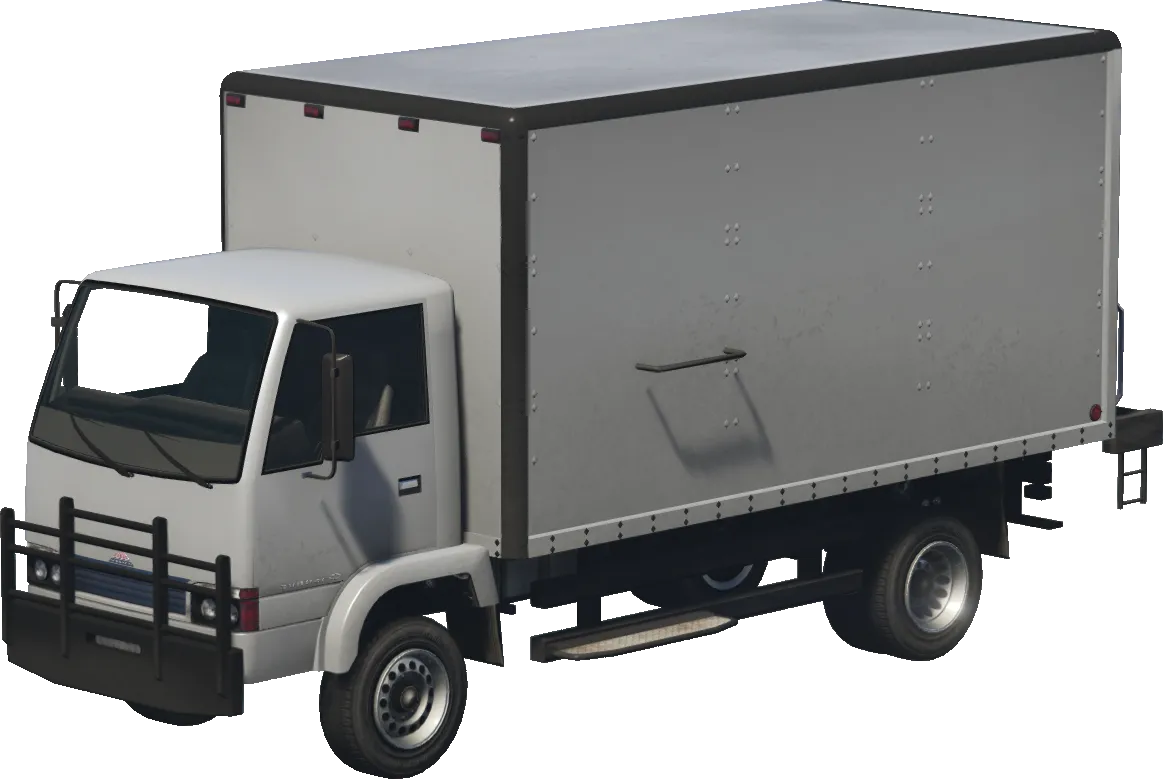
Maibatsu Mule Custom in GTA V

The Maibatsu Mule Custom is a commercial car in GTA V, spawn name mule4. It ships with 30 factory liveries in its mod kit. Download them below as a starting template, or design a new livery right on the car and get a resource ready for your FiveM server.

Spawn name
mule4
Make
Maibatsu
Class
Commercial
DLC
mpbattle
Factory liveries
30 (mod kit)
format_paintDesign a livery for the Mule Custom

Factory liveries (30)

The original livery sheets of the Maibatsu Mule Custom. Use them as a template: they show exactly where each part of the body sits on the sheet.

Maibatsu Mule Custom livery 1 template
Livery 1 · 2048×2048Download
Maibatsu Mule Custom livery 2 template
Livery 2 · 2048×2048Download
Maibatsu Mule Custom livery 3 template
Livery 3 · 2048×2048Download
Maibatsu Mule Custom livery 4 template
Livery 4 · 2048×2048Download
Maibatsu Mule Custom livery 5 template
Livery 5 · 2048×2048Download
Maibatsu Mule Custom livery 6 template
Livery 6 · 2048×2048Download
Maibatsu Mule Custom livery 7 template
Livery 7 · 2048×2048Download
Maibatsu Mule Custom livery 8 template
Livery 8 · 2048×2048Download
Maibatsu Mule Custom livery 9 template
Livery 9 · 2048×2048Download
Maibatsu Mule Custom livery 10 template
Livery 10 · 2048×2048Download
Maibatsu Mule Custom livery 11 template
Livery 11 · 2048×2048Download
Maibatsu Mule Custom livery 12 template
Livery 12 · 2048×2048Download
Maibatsu Mule Custom livery 13 template
Livery 13 · 2048×2048Download
Maibatsu Mule Custom livery 14 template
Livery 14 · 2048×2048Download
Maibatsu Mule Custom livery 15 template
Livery 15 · 2048×2048Download
Maibatsu Mule Custom livery 16 template
Livery 16 · 1024×1024Download
Maibatsu Mule Custom livery 17 template
Livery 17 · 1024×1024Download
Maibatsu Mule Custom livery 18 template
Livery 18 · 2048×2048Download
Maibatsu Mule Custom livery 19 template
Livery 19 · 2048×2048Download
Maibatsu Mule Custom livery 20 template
Livery 20 · 2048×2048Download
Maibatsu Mule Custom livery 21 template
Livery 21 · 2048×2048Download
Maibatsu Mule Custom livery 22 template
Livery 22 · 2048×2048Download
Maibatsu Mule Custom livery 23 template
Livery 23 · 2048×2048Download
Maibatsu Mule Custom livery 24 template
Livery 24 · 2048×2048Download
Maibatsu Mule Custom livery 25 template
Livery 25 · 2048×2048Download
Maibatsu Mule Custom livery 26 template
Livery 26 · 2048×2048Download
Maibatsu Mule Custom livery 27 template
Livery 27 · 2048×2048Download
Maibatsu Mule Custom livery 28 template
Livery 28 · 2048×2048Download
Maibatsu Mule Custom livery 29 template
Livery 29 · 2048×2048Download
Maibatsu Mule Custom livery 30 template
Livery 30 · 2048×2048Download

How to add a custom livery to the Maibatsu Mule Custom in FiveM

  1. 1

    Open the Maibatsu Mule Custom in the Vehicle Creator

    Pick the Maibatsu Mule Custom from the garage. It loads in 3D with its real UV map.

  2. 2

    Design the livery

    Add text, images, logos and shapes right on the car, or start from one of the factory liveries above.

  3. 3

    Export and install

    Download the resource, drop it in your resources folder and add ensure to server.cfg. Or send it straight to your server with ORB Core.

FAQ

What is the spawn name of the Maibatsu Mule Custom?

The spawn name is mule4. In FiveM you can spawn it with /car mule4 on most servers.

How many liveries does the Maibatsu Mule Custom have?

It has 30 factory liveries in its mod kit. They are picked in the mod shop (Livery).

Can I add my own livery to the Maibatsu Mule Custom?

Yes. The Maibatsu Mule Custom uses a mod kit, so a new livery can be added as an extra option next to the factory ones, without replacing any of them.
More commercial livery templates